
- https://forum.uvnc.com/viewtopic.php?t=17342
I used the InstantSupportCompileAll.exe in the 3.1j directory. I tried the install.exe first, but none of my branding was present and the such.Rat wrote:Did you run "ChunkVNCRemoteSupport_Install_3.1j.exe" or try to compile the source code directly?
Rat wrote:Can you post your "InstantSupportDefs.au3" file here?
I wrote:; Select wether to use encryption with Viewer, (Mac InstantSupport doesn't use encryption)
Global $EncryptViewer = True
; VNC Server and Repeater ports
Global $ServerPort = 5900 ; External port of the VNC Server
Global $RepeaterPort = 5500 ; External port of the VNC Repeater Server
; Select Connection ID Type, (1 = Fixed, 2 = User-Selected, 3 = Random)
Global Const $ConnectIdFixed = 1, $ConnectIdUser = 2, $ConnectIdRandom = 3, $ConnectIdList = 4
Global Const $LowerLimit = 100000, $UpperLimit = 999999
Global $ConnectIdType = $ConnectIdFixed
; Define a Unique Connection ID number
Switch $ConnectIdType
Case $ConnectIdFixed
$ConnectId = 123456
Case $ConnectIdUser
$ConnectId = 'Enter a Connection ID'
Case $ConnectIdRandom
$ConnectId = Random($LowerLimit, $UpperLimit, 1) ; Generate a random Connection ID number
Case Else
$ConnectId = 'Enter a Connection ID'
$ConnectIdType = $ConnectIdUser
EndSwitch
; Connect to the VNC repeater server automatically after startup
$AutoConnect = False
; Display Code, (ignored except for $ConnectIdFixed)
Global $ShowID = False
If $ConnectIdType <> $ConnectIdFixed Then $ShowId = True
; Define some Re-branding Strings
Global $BrandName = 'Burtons OpenSource Solutions' ; Used for tooltip when clicking on the logo
Global $LongName = 'Burtons OpenSource Solutions Remote Support'
Global $ShortName = 'BOSSRemote'
; URLs
Global $RepeaterUrl = 'www.burtonsoss.com'
Global $WebURL = 'www.burtonsoss.com'
; Display a message box prompt if an RC4 encryption file already exists during compilation
Global $KeepExistingRc4 = True
; Pin the Window to the top of the Z-Order
Global $PinWindow = True ; If $PinWindow is True then double-clicking the logo image will Un-Pin the window
Global $UnPinKeyCode = '^u' ; Type this Hotkey code to Un-Pin window
; Exe Icons
Global $InstallerIcon = 'InstallerIcon.BOSS'
Global $ServerIcon = 'ServerIcon.BOSS'
Global $ViewerIcon = 'ViewerIcon.BOSS'
; Show Window Titlebar and Border
Global $ShowTitleBar = False
; Enable Click on Logo to load $WebURL
Global $AllowLogoClick = False
; GUI Background Colour
Global $BackgroundColor = 0x707E89
; Show the Exit Button
Global $ShowExitButton = True
Global $ExitButtonLeft = 8
Global $ExitButtonTop = 222
; Show the Help Button
Global $ShowHelpButton = True
Global $HelpButtonLeft = 80
Global $HelpButtonTop = 222
; Show the Connect Button
Global $ShowConnectButton = True
Global $ConnectButtonLeft = 152
Global $ConnectButtonTop = 222
; Top/Left coordinates and Width and Height of clickable Logo image
Global $LogoLeft = 0
Global $LogoTop = 0
Global $LogoWidth = 600
Global $LogoHeight = 300
; Height, Font and Colour of Connection ID text
Global $IdHeight = 61
Global $IdFont = 'Arial Black'
Global $IdFontStyle = 0 ;0 - Normal, 2 - Bold, 3 - Italic, 4 - Underline, 8 - Strikethrough
Global $IdFontSize = 45 ; in pixels
Global $IdFontColor = 0xFFFFFF
; Width and Height of Dialog client viewport area, (in this case same as the Logo since it covers the entire form client area)
Global $GuiWidth = $LogoWidth
Global $GuiHeight = $LogoHeight
If $ShowId Then $GuiHeight = $GuiHeight + $IdHeight
; Specify Connection Timeout Fail Interval, Note: Remote Support server will automatically exit if unable to connect within this interval.
Global $ConnectTimeout = 300 ; (seconds) Note: Set $ConnectTimeout to 0 to ignore
; Hide application window when connected, (restore from system tray menu)
Global $HideOnConnect = True
; Top/Left coordinates and Width and Height of clickable Staff List
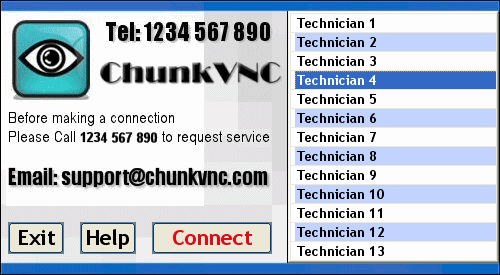
Global $StaffListLeft = 288
Global $StaffListTop = 11
Global $StaffListWidth = 211
Global $StaffListHeight = 252
; Define Staff list and their Connection ID's as a global Array. Each entry consists of the following value pair: [<Staff Name>, <Staff ID>]. Note Set $StaffList to 0 to ignore
Global $StaffList[13][2] = _
[ _
['Technician 1', 100001], _
['Technician 2', 100002], _
['Technician 3', 100003], _
['Technician 4', 100004], _
['Technician 5', 100005], _
['Technician 6', 100006], _
['Technician 7', 100007], _
['Technician 8', 100008], _
['Technician 9', 100009], _
['Technician 10', 100010], _
['Technician 11', 100011], _
['Technician 12', 100012], _
['Technician 13', 100013] _
]
If Not $StaffList = 0 Then ; Disable $ConnectId if $StaffList defined
$ConnectId = 0
$ConnectIdType = $ConnectIdList
EndIf
Yes, I ran this, and it compiled without errors, but branding and customization was not present. This was the first step for my troubleshooting. This is when I decided I should consult this forum, made me think it was something I had done in my customization process.Rat wrote:Also have you successfully installed and run the "Out-Of-The-Box" solution provided by the "ChunkVNCRemoteSupport_Install_3.1j.exe"?
I just ran this on a cleanskin Virtual machine and it worked without any errors. Both the Server and Viewer it created also ran without any errors?
Well then, I will reunpack the zip, and start all over with this file, I will then report back.Rat wrote:I just successfully compiled and ran ChunkVNC v3.1j with your Defs file...
Of course I don't have your Exe Icons or Logo, but your other customisations were all there?l
I tried it again, I keep getting an ultravnc connection page, script pauses.clayb226 wrote:Well then, I will reunpack the zip, and start all over with this file, I will then report back.Rat wrote:I just successfully compiled and ran ChunkVNC v3.1j with your Defs file...
Of course I don't have your Exe Icons or Logo, but your other customisations were all there?l
Did not compile for me, I unpacked a fresh copy, inserted my InstantSupportDefs.au3 file, then tried to compile. I am going to take a break, and try again some other time. I still have a fully functional 3.1g version running great.clayb226 wrote:I tried it again, I keep getting an ultravnc connection page, script pauses.clayb226 wrote:Well then, I will reunpack the zip, and start all over with this file, I will then report back.Rat wrote:I just successfully compiled and ran ChunkVNC v3.1j with your Defs file...
Of course I don't have your Exe Icons or Logo, but your other customisations were all there?l

