
Download:
- https://uvnc.eu/download/1800/UltraVNC_1830.zip
Based on the feedback from 1.8.2.9.
The biggest issue was that the libs we used (zlib, jpeg..) were compiled with 2 different compilers, causing several side effect.
Changes:
- Update translation files for novnc
- Clipboard fix
- Translation pr-BR
- XZ encoder fix
- Fix realvnc viewer
- Update noVNC submodule for monitor selection
UltraVNC 1.8.X.X - Feedback
Re: UltraVNC 1.8.X.X - Feedback
UltraVNC links (join us on social networks):
- Website: https://uvnc.com/
- Forum: https://forum.uvnc.com/
- GitHub sourcecode: https://github.com/ultravnc/UltraVNC
- Mastodon: https://mastodon.social/@ultravnc
- Bluesky/AT Protocol: https://bsky.app/profile/ultravnc.bsky.social
- Facebook: https://www.facebook.com/ultravnc1
- X/Twitter: https://x.com/ultravnc1
- Reddit community: https://www.reddit.com/r/ultravnc
- OpenHub: https://openhub.net/p/ultravnc
- uvnc2me: https://uvnc2me.com/
- Website: https://uvnc.com/
- Forum: https://forum.uvnc.com/
- GitHub sourcecode: https://github.com/ultravnc/UltraVNC
- Mastodon: https://mastodon.social/@ultravnc
- Bluesky/AT Protocol: https://bsky.app/profile/ultravnc.bsky.social
- Facebook: https://www.facebook.com/ultravnc1
- X/Twitter: https://x.com/ultravnc1
- Reddit community: https://www.reddit.com/r/ultravnc
- OpenHub: https://openhub.net/p/ultravnc
- uvnc2me: https://uvnc2me.com/
Re: UltraVNC 1.8.X.X - Feedback
@lwc: The noVNC is a replacement for the Java Viewer that wasn't working (unless you used a very old browser).
The Server has a building HTTP Server instead of using the Viewer: vncviewer.exe -connect myhost:5900.
You can use any browsers and connect using HTTP or HTTPS: http://myhost:5800.
This works on all OS's, not only Windows.
The Server has a building HTTP Server instead of using the Viewer: vncviewer.exe -connect myhost:5900.
You can use any browsers and connect using HTTP or HTTPS: http://myhost:5800.
This works on all OS's, not only Windows.
UltraVNC links (join us on social networks):
- Website: https://uvnc.com/
- Forum: https://forum.uvnc.com/
- GitHub sourcecode: https://github.com/ultravnc/UltraVNC
- Mastodon: https://mastodon.social/@ultravnc
- Bluesky/AT Protocol: https://bsky.app/profile/ultravnc.bsky.social
- Facebook: https://www.facebook.com/ultravnc1
- X/Twitter: https://x.com/ultravnc1
- Reddit community: https://www.reddit.com/r/ultravnc
- OpenHub: https://openhub.net/p/ultravnc
- uvnc2me: https://uvnc2me.com/
- Website: https://uvnc.com/
- Forum: https://forum.uvnc.com/
- GitHub sourcecode: https://github.com/ultravnc/UltraVNC
- Mastodon: https://mastodon.social/@ultravnc
- Bluesky/AT Protocol: https://bsky.app/profile/ultravnc.bsky.social
- Facebook: https://www.facebook.com/ultravnc1
- X/Twitter: https://x.com/ultravnc1
- Reddit community: https://www.reddit.com/r/ultravnc
- OpenHub: https://openhub.net/p/ultravnc
- uvnc2me: https://uvnc2me.com/
Re: UltraVNC 1.8.X.X - Feedback
If time please test 1.8.3.0, release will be next week.
UltraVNC links (join us on social networks):
- Website: https://uvnc.com/
- Forum: https://forum.uvnc.com/
- GitHub sourcecode: https://github.com/ultravnc/UltraVNC
- Mastodon: https://mastodon.social/@ultravnc
- Bluesky/AT Protocol: https://bsky.app/profile/ultravnc.bsky.social
- Facebook: https://www.facebook.com/ultravnc1
- X/Twitter: https://x.com/ultravnc1
- Reddit community: https://www.reddit.com/r/ultravnc
- OpenHub: https://openhub.net/p/ultravnc
- uvnc2me: https://uvnc2me.com/
- Website: https://uvnc.com/
- Forum: https://forum.uvnc.com/
- GitHub sourcecode: https://github.com/ultravnc/UltraVNC
- Mastodon: https://mastodon.social/@ultravnc
- Bluesky/AT Protocol: https://bsky.app/profile/ultravnc.bsky.social
- Facebook: https://www.facebook.com/ultravnc1
- X/Twitter: https://x.com/ultravnc1
- Reddit community: https://www.reddit.com/r/ultravnc
- OpenHub: https://openhub.net/p/ultravnc
- uvnc2me: https://uvnc2me.com/
Re: UltraVNC 1.8.X.X - Feedback
Hello,
Today I accidentally noticed incorrect behavior that creates a potential security risk. I first observed it in version 1.8.2.4, then updated to version 1.8.2.9, but the problem remains.
My configuration requires the use of SecureVNCPlugin64.dsm. For this purpose, I have created the following files:
- xxxx_ServerClientAuth.pkey – This file remains in the program directory on the server.
- xxxx_ViewerClientAuth.pkey – This file is removed from the server and placed on the computer running the Viewer.
The ultravnc.ini file is located in ProgramData.
The problem is that the Viewer can establish a connection even when xxxx_ViewerClientAuth.pkey is not present in its directory.
The same applies to xxxx_ServerClientAuth.pkey – even when I remove it from the program directory, the connection can still be established.
I have more than 100 machines running version 1.4.3.6, and in that version, when encryption is enabled, a connection cannot be established if the two .pkey files are not in their correct locations.
Could you please help me understand whether I am missing something or if this is incorrect behavior?
Thanks
Today I accidentally noticed incorrect behavior that creates a potential security risk. I first observed it in version 1.8.2.4, then updated to version 1.8.2.9, but the problem remains.
My configuration requires the use of SecureVNCPlugin64.dsm. For this purpose, I have created the following files:
- xxxx_ServerClientAuth.pkey – This file remains in the program directory on the server.
- xxxx_ViewerClientAuth.pkey – This file is removed from the server and placed on the computer running the Viewer.
The ultravnc.ini file is located in ProgramData.
The problem is that the Viewer can establish a connection even when xxxx_ViewerClientAuth.pkey is not present in its directory.
The same applies to xxxx_ServerClientAuth.pkey – even when I remove it from the program directory, the connection can still be established.
I have more than 100 machines running version 1.4.3.6, and in that version, when encryption is enabled, a connection cannot be established if the two .pkey files are not in their correct locations.
Could you please help me understand whether I am missing something or if this is incorrect behavior?
Thanks

Re: UltraVNC 1.8.X.X - Feedback
I tried the Copy text command again several times yesterday. It is working perfectly in both directions. I must have had a glitch the first time I tested it. Thank you for this enhancement!

Re: UltraVNC 1.8.X.X - Feedback
My usage is SC/Reverse scenario: I want to assist someone, so that someone launches SC and connects to me after I use vncviewer.exe -listen. Can that someone use a browser to connect to me instead of downloading anything? That would be amazing.RudiDeVos wrote: 2026-09-12 12:11 lwc: The noVNC is a replacement for the Java Viewer that wasn't working (unless you used a very old browser).
The Server has a building HTTP Server instead of using the Viewer: vncviewer.exe -connect myhost:5900.
You can use any browsers and connect using HTTP or HTTPS: http://myhost:5800.
This works on all OS's, not only Windows.
Last edited by lwc on 2026-09-12 18:04, edited 1 time in total.
P.S.
Did anyone try to use the new -sc/sc_prompt/sc_exit command line options?
Did anyone try to use the new -sc/sc_prompt/sc_exit command line options?
Re: UltraVNC 1.8.X.X - Feedback
@lwc: noVNC is not a SC replacement; Where the Server connect to the Viewer.
@ddbivens: Clipboard was changed in 1.8.3.0 for HTML and dib from remote to local.
@ddbivens: Clipboard was changed in 1.8.3.0 for HTML and dib from remote to local.
UltraVNC links (join us on social networks):
- Website: https://uvnc.com/
- Forum: https://forum.uvnc.com/
- GitHub sourcecode: https://github.com/ultravnc/UltraVNC
- Mastodon: https://mastodon.social/@ultravnc
- Bluesky/AT Protocol: https://bsky.app/profile/ultravnc.bsky.social
- Facebook: https://www.facebook.com/ultravnc1
- X/Twitter: https://x.com/ultravnc1
- Reddit community: https://www.reddit.com/r/ultravnc
- OpenHub: https://openhub.net/p/ultravnc
- uvnc2me: https://uvnc2me.com/
- Website: https://uvnc.com/
- Forum: https://forum.uvnc.com/
- GitHub sourcecode: https://github.com/ultravnc/UltraVNC
- Mastodon: https://mastodon.social/@ultravnc
- Bluesky/AT Protocol: https://bsky.app/profile/ultravnc.bsky.social
- Facebook: https://www.facebook.com/ultravnc1
- X/Twitter: https://x.com/ultravnc1
- Reddit community: https://www.reddit.com/r/ultravnc
- OpenHub: https://openhub.net/p/ultravnc
- uvnc2me: https://uvnc2me.com/
Re: UltraVNC 1.8.X.X - Feedback
@fallel: I just tested myself:
- winvnc.exe
- vncviewer.exe
- 20260912_Server_ClientAuth.pubkey
- 20260912_Viewer_ClientAuth.pkey
-> OK
If I rename: 20260912_Viewer_ClientAuth.pkey to 20260912_Viewer_ClientAuth.pkey2
-> Key error
Need more info.
On the Server, activate logging and press show all, them make a connection perhaps it shows something.
- winvnc.exe
- vncviewer.exe
- 20260912_Server_ClientAuth.pubkey
- 20260912_Viewer_ClientAuth.pkey
-> OK
If I rename: 20260912_Viewer_ClientAuth.pkey to 20260912_Viewer_ClientAuth.pkey2
-> Key error
Need more info.
On the Server, activate logging and press show all, them make a connection perhaps it shows something.
UltraVNC links (join us on social networks):
- Website: https://uvnc.com/
- Forum: https://forum.uvnc.com/
- GitHub sourcecode: https://github.com/ultravnc/UltraVNC
- Mastodon: https://mastodon.social/@ultravnc
- Bluesky/AT Protocol: https://bsky.app/profile/ultravnc.bsky.social
- Facebook: https://www.facebook.com/ultravnc1
- X/Twitter: https://x.com/ultravnc1
- Reddit community: https://www.reddit.com/r/ultravnc
- OpenHub: https://openhub.net/p/ultravnc
- uvnc2me: https://uvnc2me.com/
- Website: https://uvnc.com/
- Forum: https://forum.uvnc.com/
- GitHub sourcecode: https://github.com/ultravnc/UltraVNC
- Mastodon: https://mastodon.social/@ultravnc
- Bluesky/AT Protocol: https://bsky.app/profile/ultravnc.bsky.social
- Facebook: https://www.facebook.com/ultravnc1
- X/Twitter: https://x.com/ultravnc1
- Reddit community: https://www.reddit.com/r/ultravnc
- OpenHub: https://openhub.net/p/ultravnc
- uvnc2me: https://uvnc2me.com/
Re: UltraVNC 1.8.X.X - Feedback
@RudiDeVos: Here are two screenshots from the Viewer side and the Server side, showing the renamed `.pkey` files as well as the checkbox for enabling encryption. If I rename just one of the files, regardless of which side it is on, I can still establish a connection.


I am also sending the `winvnc.log` file:
I am also sending the `winvnc.log` file:
Code: Select all
2026-09-12 21:52:04
WinVNCAppMain : server created ok
imp_desktop_thread : SelectHDESK to Default (310) from 16c
imp_desktop_thread : Username SYSTEM
vncMenu::vncMenu : vncmenu(server)
DesktopUsersToken::getDesktopUsersToken : GetExplorerLogonPid 6100
 --The data area passed to a system call is too small.
vncServer::SetDSMPlugin : $$$$$$$$$$ SetDSMPlugin - Plugin successfully loaded
 --The system could not find the environment option that was entered.
vncServer::SetDSMPlugin : DSMPlugin Params OK
 --The system cannot find the path specified.
vncServer::SetDSMPlugin : $$$$$$$$$$ SetDSMPlugin - Plugin successfully loaded
vncServer::SetDSMPlugin : DSMPlugin Params OK
 --The system cannot find the path specified.
imp_desktop_thread : PostAddNewClient IIIII
 --The specified module could not be found.
vncServer::AutoConnectRetry : AutoConnectRetry(): started
vncServer::actualRetryThread : Attempting AutoReconnect....
vncServer::AddClient : AddClient() started
vncClient::vncClient : vncClient() executing...
2026-09-12 21:52:05
vncServer::AddClient : AddClient() done
vncServer::actualRetryThread : leaving reconnectThread....
vncClientThread::run : client connected : XXX.XXX.XXX.XXX (1)
2026-09-12 21:53:07
vncClientThread::InitVersion : Keepalive received
2026-09-12 21:54:07
vncClientThread::InitVersion : Keepalive received
2026-09-12 21:54:36
vncClientThread::run : negotiated version
Entered InitAuthenticate
2026-09-12 21:54:37
vncDesktop::KillScreenSaver : KillScreenSaver...
2026-09-12 21:54:38
vncDesktop::Startup : InitVideoDriver Called
 --The requested resource is in use.
vncDesktop::Startup : Driver option disabled
vncDesktop::InitBitmap : No driver used
vncDesktop::InitBitmap : bitmap dimensions are 1920 x 1080
vncDesktop::InitBitmap : created memory bitmap
vncDesktop::InitBitmap : got bitmap format
vncDesktop::EnableOptimisedBlits : attempting to enable DIBsection blits
vncDesktop::EnableOptimisedBlits : enabled fast DIBsection blits OK
vncDesktop::SetPalette : no palette data for truecolour display
DesktopWndProc : wmcreate
vncDesktop::InitWindow : OOOOOOOOOOOO load hookdll's
vncDesktop::InitWindow : OOOOOOOOOOOO start dispatch
 --The specified module could not be found.
vncBuffer::CheckBuffer : request local buffer[8294400]
vncBuffer::CheckBuffer : fast blits detected - using DIBsection buffer
vncBuffer::CheckBuffer : local buffer=8294400
vncDesktop::SethookMechanism : Sethook_restart_wanted hook=1 driver=0
vncDesktop::SethookMechanism : Hookdll status changed
vncEncodeMgr::SetEncoding : raw encoder requested
vncEncoder::SetTranslateFunction : only 8, 16 or 32-bit supported remotely - 0 requested
vncEncoder::SetTranslateFunction : no translation required
vncEncodeMgr::CheckBuffer : request client buffer[8294412]
vncServer::Authenticated : Authenticated() done
vncClientThread::run : authenticated connection
vncBuffer::CheckBuffer : request local buffer[8294400]
vncBuffer::CheckBuffer : fast blits detected - using DIBsection buffer
vncBuffer::CheckBuffer : local buffer=8294400
vncClientThread::run : sent pixel format to client
vncClientUpdateThread::Init : init update thread
vncClientUpdateThread::run_undetached : starting update thread
vncEncodeMgr::SetClientFormat : SetClientFormat called
vncEncoder::SetTranslateFunction : triple LUT used
vncEncodeMgr::CheckBuffer : request client buffer[2073612]
vncClientThread::run : ZRLE found
vncEncodeMgr::SetEncoding : ZRLE encoder requested
vncEncoder::SetTranslateFunction : only 8, 16 or 32-bit supported remotely - 0 requested
vncEncoder::SetTranslateFunction : triple LUT used
vncDesktopThread::run_undetached : Wait for viewer init
vncEncodeMgr::CheckBuffer : request client buffer[3110428]
vncClientThread::run : XZ found
vncClientThread::run : Tight found
vncClientThread::run : compression level requested: 6
vncClientThread::run : Full-color cursor shape updates enabled
vncClientThread::run : PointerPos protocol extension enabled
vncClientThread::run : image quality level requested: 6
vncClientThread::run : XOR protocol extension enabled
vncClientThread::run : LastRect protocol extension enabled
vncClientThread::run : Cache protocol extension enabled
vncClientThread::run : ServerState protocol extension enabled
vncClientThread::run : KeepAlive protocol extension enabled
vncClientThread::run : IdleTime protocol extension enabled
vncClientThread::run : FTProtocolVersion protocol extension enabled
vncClientThread::run : KeepAlive protocol extension enabled
vncClientThread::run : IdleTime protocol extension enabled
vncClientThread::run : Unicode Text Chat protocol extension enabled
vncClientThread::run : Extended clipboard protocol extension enabled
vncClientThread::run : Streaming DSM support enabled
vncEncoder::GetRemotePalette : remote palette data requested
vncDesktopThread::run_undetached : Wait for viewer init
vncDesktopThread::handle_display_change : m_desktop->Shutdown --The requested resource is in use.
vncDesktop::ShutdownInitWindowthread : ShutdownInitWindowthread
desktopSelector::SelectHDESK : SelectHDESK to Default (16c) from 16c
2026-09-12 21:54:39
vncDesktopThread::handle_display_change : m_desktop->StartupvncDesktop::Startup : InitVideoDriver Called
 --The requested resource is in use.
vncDesktop::Startup : Driver option disabled
vncDesktop::InitBitmap : No driver used
vncDesktop::InitBitmap : bitmap dimensions are 1920 x 1080
vncDesktop::InitBitmap : created memory bitmap
vncDesktop::InitBitmap : got bitmap format
vncDesktop::EnableOptimisedBlits : attempting to enable DIBsection blits
vncDesktop::EnableOptimisedBlits : enabled fast DIBsection blits OK
vncDesktop::SetPalette : no palette data for truecolour display
vncBuffer::CheckBuffer : request local buffer[8294400]
vncBuffer::CheckBuffer : fast blits detected - using DIBsection buffer
vncBuffer::CheckBuffer : local buffer=8294400
vncDesktopThread::handle_display_change : threadHandle
vncDesktopThread::handle_display_change : threadHandle2
vncClient::SendCacheRectangles : ******** Sending 1 Cache Rects
2026-09-12 21:54:40
DesktopWndProc : set hooks OK
2026-09-12 21:54:41
vncClient::SendCacheRectangles : ******** Sending 1 Cache Rects
2026-09-12 21:54:42
vncClient::SendCacheRectangles : ******** Sending 2 Cache Rects
vncClient::SendCacheRectangles : ******** Sending 3 Cache Rects
2026-09-12 21:54:43
vncClient::SendCacheRectangles : ******** Sending 1 Cache Rects
2026-09-12 21:54:47
vncClient::SendCacheRectangles : ******** Sending 1 Cache Rects
2026-09-12 21:54:48
vncClient::SendCacheRectangles : ******** Sending 2 Cache Rects
2026-09-12 21:54:49
VSocket::ReadExactIPV4 : zero bytes read1
desktopSelector::SelectHDESK : SelectHDESK to Default (16c) from 16c
vncClientThread::run : client disconnected : XXX.XXX.XXX.XXX (1)
vncDesktop::~vncDesktop : ~vncDesktop
DesktopWndProc : Unsethooks OK
DesktopWndProc : WM_DESTROY
vncServer::KillAuthClients : KillAuthClients() done
 --The requested resource is in use.
vncDesktop::StopInitWindowthread : ~vncDesktop:: iniwindowthread proper closed
vncDesktop::ShutdownInitWindowthread : ShutdownInitWindowthread
desktopSelector::SelectHDESK : SelectHDESK to Default (16c) from 16c
vncDesktop::ShutdownInitWindowthread : ShutdownInitWindowthread
desktopSelector::SelectHDESK : SelectHDESK to Default (16c) from 16c
vncDesktop::~vncDesktop : ~vncDesktop Shutdown()
vncDesktop::~vncDesktop : ~vncDesktop m_lGridsList.clear
2026-09-12 21:54:50
vncServer::RemoveClient : desktop deleted
vncServer::RemoveClient : RemoveClient() done
vncClientThread::run : PostAddNewClient II
vncClient::~vncClient : ~vncClient() executing...
vncClient::~vncClient : deleting socket
VSocket::CloseIPV4 : closing socket
vncServer::AutoConnectRetry : AutoConnectRetry(): started
vncServer::actualRetryThread : Attempting AutoReconnect....
vncServer::AddClient : AddClient() started
vncClient::vncClient : vncClient() executing...
vncServer::AddClient : AddClient() done
vncServer::actualRetryThread : leaving reconnectThread....
vncClientThread::run : client connected : XXX.XXX.XXX.XXX (1)
Re: UltraVNC 1.8.X.X - Feedback
@fallel: The Viewer can have multiple keys, and use the key that the Server says he is using:
- Server 1 zzzx0399
- server 2 zzzx0398
The Viewer has 2 keys zzzx0399 and zzzx0398, this way the same Viewer can be used for the 2 Servers.
When Server name is not found, use the available... Just handy when you have only one key then the name doesn't matter.
The name of the keys is just a name to be able to use multiple Server.
The key content is actual what make you connect.
- Server 1 zzzx0399
- server 2 zzzx0398
The Viewer has 2 keys zzzx0399 and zzzx0398, this way the same Viewer can be used for the 2 Servers.
When Server name is not found, use the available... Just handy when you have only one key then the name doesn't matter.
The name of the keys is just a name to be able to use multiple Server.
The key content is actual what make you connect.
UltraVNC links (join us on social networks):
- Website: https://uvnc.com/
- Forum: https://forum.uvnc.com/
- GitHub sourcecode: https://github.com/ultravnc/UltraVNC
- Mastodon: https://mastodon.social/@ultravnc
- Bluesky/AT Protocol: https://bsky.app/profile/ultravnc.bsky.social
- Facebook: https://www.facebook.com/ultravnc1
- X/Twitter: https://x.com/ultravnc1
- Reddit community: https://www.reddit.com/r/ultravnc
- OpenHub: https://openhub.net/p/ultravnc
- uvnc2me: https://uvnc2me.com/
- Website: https://uvnc.com/
- Forum: https://forum.uvnc.com/
- GitHub sourcecode: https://github.com/ultravnc/UltraVNC
- Mastodon: https://mastodon.social/@ultravnc
- Bluesky/AT Protocol: https://bsky.app/profile/ultravnc.bsky.social
- Facebook: https://www.facebook.com/ultravnc1
- X/Twitter: https://x.com/ultravnc1
- Reddit community: https://www.reddit.com/r/ultravnc
- OpenHub: https://openhub.net/p/ultravnc
- uvnc2me: https://uvnc2me.com/
Re: UltraVNC 1.8.X.X - Feedback
@RudiDeVos: OK, so far I have been working exactly this way — for each server, I have generated separate .pkey files.
For example, I have two laptops: "LAP-D" and "LAP-B":
"LAP-D" uses "0138_Viewer...".pkey, while "LAP-B" uses "0150_Viewer...".pkey.
LAP-D.vnc has the following configuration:
LAP-B.vnc has the following configuration:
I use many .vnc files to establish the connections. Together with the ".vnc" files, the ".._Viewer..".pkey files are also kept there.

My problem now is that I can establish a connection to LAP-B even though the "0150_Viewer...".pkey file is not present in the folder.
I forgot to mention that I am using a Repeater.
I'm a little confused, because until now, if the corresponding "_Viewer".pkey file was missing, I couldn't establish a connection.
For example, I have two laptops: "LAP-D" and "LAP-B":
"LAP-D" uses "0138_Viewer...".pkey, while "LAP-B" uses "0150_Viewer...".pkey.
LAP-D.vnc has the following configuration:
Code: Select all
[connection]
host=ID
port=138
proxyhost=XXX.XXX.XXX.XXX
proxyport=5901
password=some password
[options]
Code: Select all
[connection]
host=ID
port=150
proxyhost=XXX.XXX.XXX.XXX
proxyport=5901
password=some password
[options]
My problem now is that I can establish a connection to LAP-B even though the "0150_Viewer...".pkey file is not present in the folder.
I forgot to mention that I am using a Repeater.
I'm a little confused, because until now, if the corresponding "_Viewer".pkey file was missing, I couldn't establish a connection.
Re: UltraVNC 1.8.X.X - Feedback
On the Viewer: After connecting, open the Connection info.
It will show Auth(RSA-2048) when client-key authentication is used (or whatever auth you selected creating the key).
Where vncviewer.exe looks for the pubkey (first match wins):
- .dsm module folder
- vncviewer.exe folder
- GetCurrentDirectory
Looking at the dates the keys are different, make sure that key 150 isn't the same as another key.
Use a tool like everything to fast check where the 150 key file exist on your system.
It will show Auth(RSA-2048) when client-key authentication is used (or whatever auth you selected creating the key).
Where vncviewer.exe looks for the pubkey (first match wins):
- .dsm module folder
- vncviewer.exe folder
- GetCurrentDirectory
Looking at the dates the keys are different, make sure that key 150 isn't the same as another key.
Use a tool like everything to fast check where the 150 key file exist on your system.
UltraVNC links (join us on social networks):
- Website: https://uvnc.com/
- Forum: https://forum.uvnc.com/
- GitHub sourcecode: https://github.com/ultravnc/UltraVNC
- Mastodon: https://mastodon.social/@ultravnc
- Bluesky/AT Protocol: https://bsky.app/profile/ultravnc.bsky.social
- Facebook: https://www.facebook.com/ultravnc1
- X/Twitter: https://x.com/ultravnc1
- Reddit community: https://www.reddit.com/r/ultravnc
- OpenHub: https://openhub.net/p/ultravnc
- uvnc2me: https://uvnc2me.com/
- Website: https://uvnc.com/
- Forum: https://forum.uvnc.com/
- GitHub sourcecode: https://github.com/ultravnc/UltraVNC
- Mastodon: https://mastodon.social/@ultravnc
- Bluesky/AT Protocol: https://bsky.app/profile/ultravnc.bsky.social
- Facebook: https://www.facebook.com/ultravnc1
- X/Twitter: https://x.com/ultravnc1
- Reddit community: https://www.reddit.com/r/ultravnc
- OpenHub: https://openhub.net/p/ultravnc
- uvnc2me: https://uvnc2me.com/
Re: UltraVNC 1.8.X.X - Feedback
@RudiDeVos
Hello,
Today I spent some time working on my problem and decided to make a comparison between two versions of uvnc: 1.4.3.6 and 1.8.2.9.
The test environment consists of one machine with only UVNC Viewer 1.8.2.9 installed.
One laptop with a fresh Windows installation, on which I will first install version 1.8.2.9 as Server only, and then version 1.4.3.6 for comparison.
I am using a machine in a data center outside my test environment, where a repeater is running.
Test 1.8.2.9
Laptop
On the laptop, I install version 1.8.2.9 as Server only.
I configure the connection parameters to use ID:500.
I create the two files 0500_Server_ClientAuth.pubkey and 0500_Viewer_ClientAuth.pkey.

In the picture, on the left, you can see the contents of C:\Program Files\uvnc\UltraVNC before the files were created.
On the right, you can see the newly created files, as well as that SecureVNCPlugin64.dsm exists in only one location.
I move 0500_Viewer_ClientAuth.pkey to the machine with UVNC Viewer 1.8.2.9.

In this picture, you can see that 0500_Viewer_ClientAuth.pkey does not exist anywhere on the disk.
We start the service and then go to UVNC Viewer 1.8.2.9.
Machine with UVNC Viewer 1.8.2.9
On this machine, only UVNC Viewer 1.8.2.9 is installed.

In the picture, you can see the installation directory and also a search of the disk showing where the files SecureVNCPlugin64.dsm and vncviewer.exe are located.
On USB flash drive I:, in the Test 5 directory, ID-500.vnc contains the connection settings.
At this point, the 0500_Viewer_ClientAuth.pkey file is not yet present.
Copying 0500_Viewer_ClientAuth.pkey to I:\Test 5

The two files together.
We successfully establish a connection.
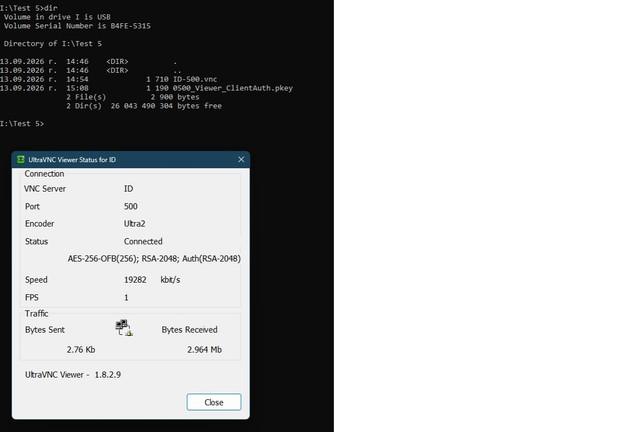
So far, everything is OK; this is how it should work.
Now we delete 0500_Viewer_ClientAuth.pkey from the I:\Test 5 directory and try to connect again.

The connection is successfully established without 0500_Viewer_ClientAuth.pkey being present.
In the picture, you can see that it was deleted and that it is no longer there.
This is where my problem is!
Now we do the same with the older version 1.4.3.6.
Laptop
On the laptop, I install version 1.4.3.6 as Server only.
I configure the connection parameters to use ID:600 so that there is a difference in the name.
I create the two files 0600_Server_ClientAuth.pubkey and 0600_Viewer_ClientAuth.pkey.
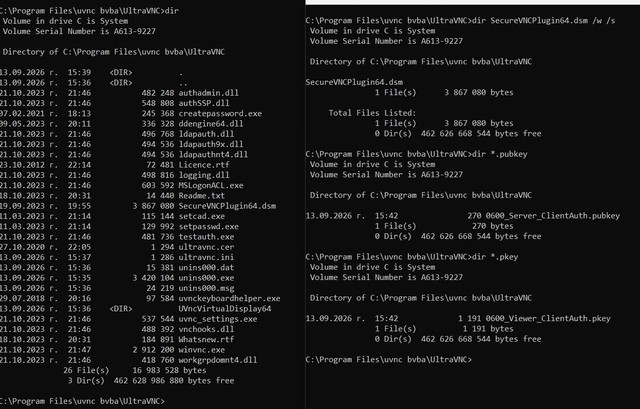
In the picture, on the left, you can see the contents of C:\Program Files\uvnc bvba\UltraVNC before the files were created.
On the right, you can see the newly created files, as well as that SecureVNCPlugin64.dsm exists in only one location.
I move 0600_Viewer_ClientAuth.pkey to the machine with UVNC Viewer 1.8.2.9.

In this picture, you can see that 0600_Viewer_ClientAuth.pkey does not exist anywhere on the disk.
We start the service and then go to UVNC Viewer 1.8.2.9.
Machine with UVNC Viewer 1.8.2.9

In the picture, you can see the installation directory and also a search of the disk showing where the files SecureVNCPlugin64.dsm and vncviewer.exe are located.
On USB flash drive I:, in the Test 5 directory, ID-600.vnc contains the connection settings.
At this point, the 0600_Viewer_ClientAuth.pkey file is not yet present.
Copying 0600_Viewer_ClientAuth.pkey to I:\Test 5
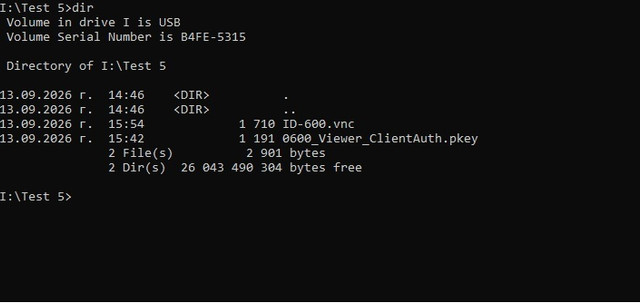
The two files together.
We successfully establish a connection.
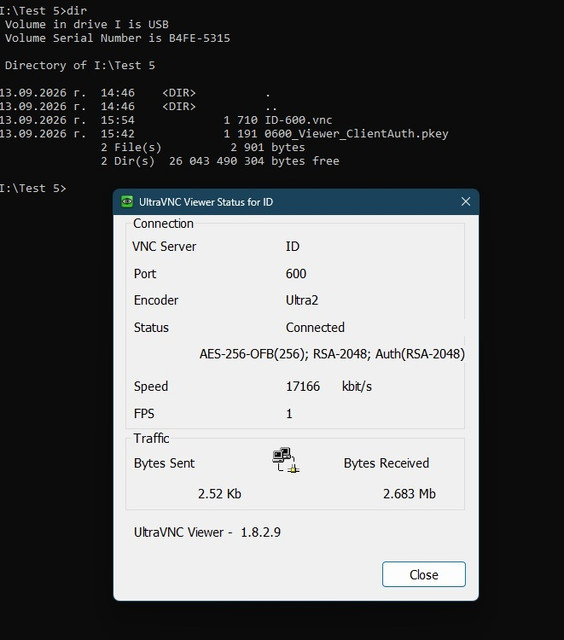
So far, everything is OK; this is how it should work.
Now we delete 0600_Viewer_ClientAuth.pkey from the I:\Test 5 directory and try to connect again.
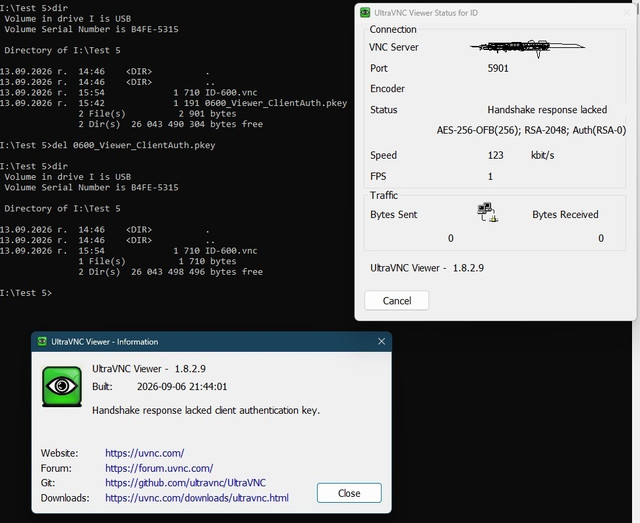
In the picture, you can see that it was deleted and that it is no longer there.
The connection is NOT established because 0600_Viewer_ClientAuth.pkey is not present!
Here, everything works exactly as expected!
Please help!
PS
Sorry for the long post!
Hello,
Today I spent some time working on my problem and decided to make a comparison between two versions of uvnc: 1.4.3.6 and 1.8.2.9.
The test environment consists of one machine with only UVNC Viewer 1.8.2.9 installed.
One laptop with a fresh Windows installation, on which I will first install version 1.8.2.9 as Server only, and then version 1.4.3.6 for comparison.
I am using a machine in a data center outside my test environment, where a repeater is running.
Test 1.8.2.9
Laptop
On the laptop, I install version 1.8.2.9 as Server only.
I configure the connection parameters to use ID:500.
I create the two files 0500_Server_ClientAuth.pubkey and 0500_Viewer_ClientAuth.pkey.
In the picture, on the left, you can see the contents of C:\Program Files\uvnc\UltraVNC before the files were created.
On the right, you can see the newly created files, as well as that SecureVNCPlugin64.dsm exists in only one location.
I move 0500_Viewer_ClientAuth.pkey to the machine with UVNC Viewer 1.8.2.9.
In this picture, you can see that 0500_Viewer_ClientAuth.pkey does not exist anywhere on the disk.
We start the service and then go to UVNC Viewer 1.8.2.9.
Machine with UVNC Viewer 1.8.2.9
On this machine, only UVNC Viewer 1.8.2.9 is installed.
In the picture, you can see the installation directory and also a search of the disk showing where the files SecureVNCPlugin64.dsm and vncviewer.exe are located.
On USB flash drive I:, in the Test 5 directory, ID-500.vnc contains the connection settings.
At this point, the 0500_Viewer_ClientAuth.pkey file is not yet present.
Copying 0500_Viewer_ClientAuth.pkey to I:\Test 5
The two files together.
We successfully establish a connection.
So far, everything is OK; this is how it should work.
Now we delete 0500_Viewer_ClientAuth.pkey from the I:\Test 5 directory and try to connect again.
The connection is successfully established without 0500_Viewer_ClientAuth.pkey being present.
In the picture, you can see that it was deleted and that it is no longer there.
This is where my problem is!
Now we do the same with the older version 1.4.3.6.
Laptop
On the laptop, I install version 1.4.3.6 as Server only.
I configure the connection parameters to use ID:600 so that there is a difference in the name.
I create the two files 0600_Server_ClientAuth.pubkey and 0600_Viewer_ClientAuth.pkey.
In the picture, on the left, you can see the contents of C:\Program Files\uvnc bvba\UltraVNC before the files were created.
On the right, you can see the newly created files, as well as that SecureVNCPlugin64.dsm exists in only one location.
I move 0600_Viewer_ClientAuth.pkey to the machine with UVNC Viewer 1.8.2.9.
In this picture, you can see that 0600_Viewer_ClientAuth.pkey does not exist anywhere on the disk.
We start the service and then go to UVNC Viewer 1.8.2.9.
Machine with UVNC Viewer 1.8.2.9
In the picture, you can see the installation directory and also a search of the disk showing where the files SecureVNCPlugin64.dsm and vncviewer.exe are located.
On USB flash drive I:, in the Test 5 directory, ID-600.vnc contains the connection settings.
At this point, the 0600_Viewer_ClientAuth.pkey file is not yet present.
Copying 0600_Viewer_ClientAuth.pkey to I:\Test 5
The two files together.
We successfully establish a connection.
So far, everything is OK; this is how it should work.
Now we delete 0600_Viewer_ClientAuth.pkey from the I:\Test 5 directory and try to connect again.
In the picture, you can see that it was deleted and that it is no longer there.
The connection is NOT established because 0600_Viewer_ClientAuth.pkey is not present!
Here, everything works exactly as expected!
Please help!
PS
Sorry for the long post!