Hello,
I would like to report an issue I encountered after updating UltraVNC to a newer version.
Environment:
- OS: Windows 11 25H2
- UltraVNC Viewer version: 1.8.2.1
- UltraVNC server version: 1.8.2.1
- Connection type: Viewer direct connecting to a remote PC
- Option enabled: Full-screen mode
Issue:
When “Full-screen mode” is enabled in the Viewer settings, the Viewer window does not appear properly after connecting.
After the connection starts, only a bar appears at the top of the screen. The actual remote desktop window is not displayed, and I cannot interact with or control the remote PC.
If I disable checkbox Full-screen mode, the connection works normally and the Viewer window is displayed correctly.
Steps to reproduce:
1. Open UltraVNC Viewer on Windows 11.
2. Enable “Full-screen mode”.
3. Connect to a remote PC.
4. After the connection is established, only the top bar appears.
5. The remote desktop window is not visible and cannot be operated.
Expected behavior:
The Viewer should open in full-screen mode and display the remote desktop normally.
Actual behavior:
Only the top bar appears, and the Viewer window/remote desktop is not displayed.
This issue started after updating to a newer version of UltraVNC. It did not occur with the previous version I was using.
Please let me know if there are any logs or settings I should provide to help investigate this issue.
Thank you.
UltraVNC 1.8.X.X - Feedback

Re: UltraVNC 1.8.X.X - Feedback
@brainshell: Thanks, I was able to repeat on Windows 11, not on Windows 10.
1 line to fix...
Please test:
- https://www.uvnc.eu/download/1800/vncviewer1821.zip
1 line to fix...
Please test:
- https://www.uvnc.eu/download/1800/vncviewer1821.zip
UltraVNC links (join us on social networks):
- Website: https://uvnc.com/
- Forum: https://forum.uvnc.com/
- GitHub sourcecode: https://github.com/ultravnc/UltraVNC
- Mastodon: https://mastodon.social/@ultravnc
- Bluesky/AT Protocol: https://bsky.app/profile/ultravnc.bsky.social
- Facebook: https://www.facebook.com/ultravnc1
- X/Twitter: https://x.com/ultravnc1
- Reddit community: https://www.reddit.com/r/ultravnc
- OpenHub: https://openhub.net/p/ultravnc
- uvnc2me: https://uvnc2me.com/
- Website: https://uvnc.com/
- Forum: https://forum.uvnc.com/
- GitHub sourcecode: https://github.com/ultravnc/UltraVNC
- Mastodon: https://mastodon.social/@ultravnc
- Bluesky/AT Protocol: https://bsky.app/profile/ultravnc.bsky.social
- Facebook: https://www.facebook.com/ultravnc1
- X/Twitter: https://x.com/ultravnc1
- Reddit community: https://www.reddit.com/r/ultravnc
- OpenHub: https://openhub.net/p/ultravnc
- uvnc2me: https://uvnc2me.com/
Re: UltraVNC 1.8.X.X - Feedback
Hi
How do I properly use silent keys for the .EXE Installer to install the UltraVNC Server and UltraVNC Viewer, as well as install the Service? Thank you!
P.S.: For 1.4.3.6, I used this, but it does't work:
How do I properly use silent keys for the .EXE Installer to install the UltraVNC Server and UltraVNC Viewer, as well as install the Service? Thank you!
P.S.: For 1.4.3.6, I used this, but it does't work:
Code: Select all
/VERYSILENT /COMPONENTS="UltraVNC_Server,UltraVNC_Viewer" /TASKS="installservice,startservice" /NORESTART /RESTARTAPPLICATIONS
Re: UltraVNC 1.8.X.X - Feedback
@brainshell: Please use the test version done by @Rudi De Vos.
@andr_ua: About .MSI files, there were a change in 1.6.x version, please look details about UltraVNC 1.6.4.0 here and please confirm us:
- https://forum.uvnc.com/viewtopic.php?t=38095
@andr_ua: About .MSI files, there were a change in 1.6.x version, please look details about UltraVNC 1.6.4.0 here and please confirm us:
- https://forum.uvnc.com/viewtopic.php?t=38095
UltraVNC links (join us on social networks):
- Website: https://uvnc.com/
- Forum: https://forum.uvnc.com/
- GitHub sourcecode: https://github.com/ultravnc/UltraVNC
- Mastodon: https://mastodon.social/@ultravnc
- Bluesky/AT Protocol: https://bsky.app/profile/ultravnc.bsky.social
- Facebook: https://www.facebook.com/ultravnc1
- X/Twitter: https://x.com/ultravnc1
- Reddit community: https://www.reddit.com/r/ultravnc
- OpenHub: https://openhub.net/p/ultravnc
- uvnc2me: https://uvnc2me.com/
- Website: https://uvnc.com/
- Forum: https://forum.uvnc.com/
- GitHub sourcecode: https://github.com/ultravnc/UltraVNC
- Mastodon: https://mastodon.social/@ultravnc
- Bluesky/AT Protocol: https://bsky.app/profile/ultravnc.bsky.social
- Facebook: https://www.facebook.com/ultravnc1
- X/Twitter: https://x.com/ultravnc1
- Reddit community: https://www.reddit.com/r/ultravnc
- OpenHub: https://openhub.net/p/ultravnc
- uvnc2me: https://uvnc2me.com/
-
brainshell
- Posts: 2
- Joined: 2017-03-20 11:13
Re: UltraVNC 1.8.X.X - Feedback
@Rudi De Vos: Thanks a lot.
I tested it on Windows 11, and it works perfectly now.
The issue seems to be fixed.
I tested it on Windows 11, and it works perfectly now.
The issue seems to be fixed.

Re: UltraVNC 1.8.X.X - Feedback
The VNC Window display windows do not maintain the correct resolution size when more than one is opened simultaneously by more than one connection, always changing to the current connection.
This is an old problem that persists.
If "Even" is checked, the resolution remains the same, and the size does not adjust to the window.
If more than one window has a different resolution than the client, only the last window remains correct.
This is an old problem that persists.
If "Even" is checked, the resolution remains the same, and the size does not adjust to the window.
If more than one window has a different resolution than the client, only the last window remains correct.
Re: UltraVNC 1.8.X.X - Feedback
@basso: When you share the same Server with multiple clients they all show the the same desktop.
VNC clones a desktop, it isn't like an RDP Server where all sessions have there own desktop.
@brainshell: Thanks 1.8.2.2 will be released in a few weeks, current waiting for other little things that can be easy changed.
VNC clones a desktop, it isn't like an RDP Server where all sessions have there own desktop.
@brainshell: Thanks 1.8.2.2 will be released in a few weeks, current waiting for other little things that can be easy changed.
UltraVNC links (join us on social networks):
- Website: https://uvnc.com/
- Forum: https://forum.uvnc.com/
- GitHub sourcecode: https://github.com/ultravnc/UltraVNC
- Mastodon: https://mastodon.social/@ultravnc
- Bluesky/AT Protocol: https://bsky.app/profile/ultravnc.bsky.social
- Facebook: https://www.facebook.com/ultravnc1
- X/Twitter: https://x.com/ultravnc1
- Reddit community: https://www.reddit.com/r/ultravnc
- OpenHub: https://openhub.net/p/ultravnc
- uvnc2me: https://uvnc2me.com/
- Website: https://uvnc.com/
- Forum: https://forum.uvnc.com/
- GitHub sourcecode: https://github.com/ultravnc/UltraVNC
- Mastodon: https://mastodon.social/@ultravnc
- Bluesky/AT Protocol: https://bsky.app/profile/ultravnc.bsky.social
- Facebook: https://www.facebook.com/ultravnc1
- X/Twitter: https://x.com/ultravnc1
- Reddit community: https://www.reddit.com/r/ultravnc
- OpenHub: https://openhub.net/p/ultravnc
- uvnc2me: https://uvnc2me.com/
Re: UltraVNC 1.8.X.X - Feedback
In this case, Viewer Listening is used.Rudi De Vos wrote: 2026-05-12 18:57 @basso: When you share the same Server with multiple clients they all show the the same desktop.
VNC clones a desktop, it isn't like an RDP Server where all sessions have there own desktop.
The sessions are called by UltraVNC SC (Single Click).
Regards
Basso
Re: UltraVNC 1.8.X.X - Feedback
@lwc: Just built it, lack time for deep testing.
Let me know if it works:
- https://uvnc.eu/download/1800/winvnc_SC_1821.zip
Let me know if it works:
- https://uvnc.eu/download/1800/winvnc_SC_1821.zip
UltraVNC links (join us on social networks):
- Website: https://uvnc.com/
- Forum: https://forum.uvnc.com/
- GitHub sourcecode: https://github.com/ultravnc/UltraVNC
- Mastodon: https://mastodon.social/@ultravnc
- Bluesky/AT Protocol: https://bsky.app/profile/ultravnc.bsky.social
- Facebook: https://www.facebook.com/ultravnc1
- X/Twitter: https://x.com/ultravnc1
- Reddit community: https://www.reddit.com/r/ultravnc
- OpenHub: https://openhub.net/p/ultravnc
- uvnc2me: https://uvnc2me.com/
- Website: https://uvnc.com/
- Forum: https://forum.uvnc.com/
- GitHub sourcecode: https://github.com/ultravnc/UltraVNC
- Mastodon: https://mastodon.social/@ultravnc
- Bluesky/AT Protocol: https://bsky.app/profile/ultravnc.bsky.social
- Facebook: https://www.facebook.com/ultravnc1
- X/Twitter: https://x.com/ultravnc1
- Reddit community: https://www.reddit.com/r/ultravnc
- OpenHub: https://openhub.net/p/ultravnc
- uvnc2me: https://uvnc2me.com/
Re: UltraVNC 1.8.X.X - Feedback
@basso: That's explains it, common value's for different sessions.
Please, try:
- https://uvnc.eu/download/1800/vncviewer1821_basso.zip
Please, try:
- https://uvnc.eu/download/1800/vncviewer1821_basso.zip
UltraVNC links (join us on social networks):
- Website: https://uvnc.com/
- Forum: https://forum.uvnc.com/
- GitHub sourcecode: https://github.com/ultravnc/UltraVNC
- Mastodon: https://mastodon.social/@ultravnc
- Bluesky/AT Protocol: https://bsky.app/profile/ultravnc.bsky.social
- Facebook: https://www.facebook.com/ultravnc1
- X/Twitter: https://x.com/ultravnc1
- Reddit community: https://www.reddit.com/r/ultravnc
- OpenHub: https://openhub.net/p/ultravnc
- uvnc2me: https://uvnc2me.com/
- Website: https://uvnc.com/
- Forum: https://forum.uvnc.com/
- GitHub sourcecode: https://github.com/ultravnc/UltraVNC
- Mastodon: https://mastodon.social/@ultravnc
- Bluesky/AT Protocol: https://bsky.app/profile/ultravnc.bsky.social
- Facebook: https://www.facebook.com/ultravnc1
- X/Twitter: https://x.com/ultravnc1
- Reddit community: https://www.reddit.com/r/ultravnc
- OpenHub: https://openhub.net/p/ultravnc
- uvnc2me: https://uvnc2me.com/

Re: UltraVNC 1.8.X.X - Feedback
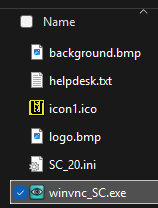
Just for the record, it seems you asked me to test a new SC version.Rudi De Vos wrote: 2026-05-13 20:37 @lwc: Just built it, lack time for deep testing.
Let me know if it works:
- https://uvnc.eu/download/1800/winvnc_SC_1821.zip
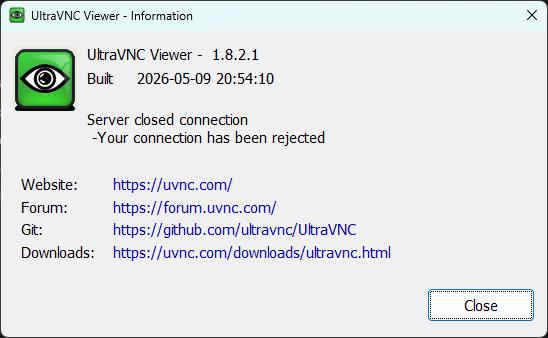
Am I supposed to just put it alongside the other SC files from the last version, and run it? If so, unfortunately, it doesn't work (at least for self connection):
P.S.
Did anyone try to use the new -sc/sc_prompt/sc_exit command line options?
Did anyone try to use the new -sc/sc_prompt/sc_exit command line options?
Re: UltraVNC 1.8.X.X - Feedback
@kannweg0815, @ddbivens, @wojtek, @basso, @kissson, @proger16, @stefanorossetti, @robytotem, @Neustradamus, @Sonderzzz, @lwc, @brainshell, @andr_ua: Thanks for all your feedback!
All is good for you now?
If it is not solved perfectly or if it has been forgotten, it is very important to specify...
All comments are important.
If you have feature request or others, please create a ticket on GitHub: https://github.com/ultravnc/UltraVNC/issues.
Please test on different machines, it is officially supported for Windows OS since Windows 7 / Windows Server 2008 R2.
We always search help for ARM Windows support and other OS too.
@basso: Have you seen the test version done for you by @Rudi De Vos?
All is good for you now?
If it is not solved perfectly or if it has been forgotten, it is very important to specify...
All comments are important.
If you have feature request or others, please create a ticket on GitHub: https://github.com/ultravnc/UltraVNC/issues.
Please test on different machines, it is officially supported for Windows OS since Windows 7 / Windows Server 2008 R2.
We always search help for ARM Windows support and other OS too.
@basso: Have you seen the test version done for you by @Rudi De Vos?
UltraVNC links (join us on social networks):
- Website: https://uvnc.com/
- Forum: https://forum.uvnc.com/
- GitHub sourcecode: https://github.com/ultravnc/UltraVNC
- Mastodon: https://mastodon.social/@ultravnc
- Bluesky/AT Protocol: https://bsky.app/profile/ultravnc.bsky.social
- Facebook: https://www.facebook.com/ultravnc1
- X/Twitter: https://x.com/ultravnc1
- Reddit community: https://www.reddit.com/r/ultravnc
- OpenHub: https://openhub.net/p/ultravnc
- uvnc2me: https://uvnc2me.com/
- Website: https://uvnc.com/
- Forum: https://forum.uvnc.com/
- GitHub sourcecode: https://github.com/ultravnc/UltraVNC
- Mastodon: https://mastodon.social/@ultravnc
- Bluesky/AT Protocol: https://bsky.app/profile/ultravnc.bsky.social
- Facebook: https://www.facebook.com/ultravnc1
- X/Twitter: https://x.com/ultravnc1
- Reddit community: https://www.reddit.com/r/ultravnc
- OpenHub: https://openhub.net/p/ultravnc
- uvnc2me: https://uvnc2me.com/
Re: UltraVNC 1.8.X.X - Feedback
Hi,
I installed 1.8.2.2 on Windows 10. I can connect to it from 1.6.4.0 clients but downloading with FT doesn't work.
I can upload (Send) files, but hitting Receive shows a message "File Transfer interrupted. Connection with server lost".
I installed 1.8.2.2 on Windows 10. I can connect to it from 1.6.4.0 clients but downloading with FT doesn't work.
I can upload (Send) files, but hitting Receive shows a message "File Transfer interrupted. Connection with server lost".
-
gjangkhanh
- Posts: 2
- Joined: 2026-05-20 06:17
Re: UltraVNC 1.8.X.X - Feedback
What is the best practice if I want to install Untra VNC 1.8.x.x via GPO in Active Directory?
I'm thinking about this way.
Step 1: Setup a good UltraVNC Server manually.
Step 2: Install via GPO for another PC.
Step 3: Copy file C:\ProgramData\UltraVNC\ultravnc.ini which installed in Step1 to another PC at Step2.
Could you please have any template to do this?
I'm thinking about this way.
Step 1: Setup a good UltraVNC Server manually.
Step 2: Install via GPO for another PC.
Step 3: Copy file C:\ProgramData\UltraVNC\ultravnc.ini which installed in Step1 to another PC at Step2.
Could you please have any template to do this?
Last edited by gjangkhanh on 2026-05-20 09:07, edited 2 times in total.
-
gjangkhanh
- Posts: 2
- Joined: 2026-05-20 06:17
Re: UltraVNC 1.8.X.X - Feedback
Authentication for Administrators Group was problems:
I do as below:
Add Administrators group into UltraVNC/Security/Windows Authentication but when UltraVNCviewer connect it cannot authenticate.
Create a group named UltraVNC then add UltraVNC group into UltraVNC/Security/Windows Authentication then when UltraVNCviewer connect it can authenticated success.
I do as below:
Add Administrators group into UltraVNC/Security/Windows Authentication but when UltraVNCviewer connect it cannot authenticate.
Create a group named UltraVNC then add UltraVNC group into UltraVNC/Security/Windows Authentication then when UltraVNCviewer connect it can authenticated success.
Re: UltraVNC 1.8.X.X - Feedback
HiRudiDeVos wrote: 2026-05-14 12:41 @basso: That's explains it, common value's for different sessions.
Please, try:
- https://uvnc.eu/download/1800/vncviewer1821_basso.zip
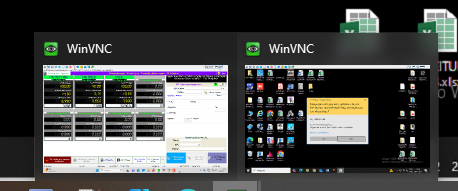
It works, it maintained the resolution in more than one open window.
Very good
Thank you.
Regards
Basso
Re: UltraVNC 1.8.X.X - Feedback
111
UltraVNC links (join us on social networks):
- Website: https://uvnc.com/
- Forum: https://forum.uvnc.com/
- GitHub sourcecode: https://github.com/ultravnc/UltraVNC
- Mastodon: https://mastodon.social/@ultravnc
- Bluesky/AT Protocol: https://bsky.app/profile/ultravnc.bsky.social
- Facebook: https://www.facebook.com/ultravnc1
- X/Twitter: https://x.com/ultravnc1
- Reddit community: https://www.reddit.com/r/ultravnc
- OpenHub: https://openhub.net/p/ultravnc
- uvnc2me: https://uvnc2me.com/
- Website: https://uvnc.com/
- Forum: https://forum.uvnc.com/
- GitHub sourcecode: https://github.com/ultravnc/UltraVNC
- Mastodon: https://mastodon.social/@ultravnc
- Bluesky/AT Protocol: https://bsky.app/profile/ultravnc.bsky.social
- Facebook: https://www.facebook.com/ultravnc1
- X/Twitter: https://x.com/ultravnc1
- Reddit community: https://www.reddit.com/r/ultravnc
- OpenHub: https://openhub.net/p/ultravnc
- uvnc2me: https://uvnc2me.com/
Re: UltraVNC 1.8.X.X - Feedback
No, I was asked to test something, but got no reply to my test results.Ludovic wrote: 2026-05-16 16:15 @kannweg0815, @ddbivens, @wojtek, @basso, @kissson, @proger16, @stefanorossetti, @robytotem, @Neustradamus, @Sonderzzz, @lwc, @brainshell, @andr_ua: Thanks for all your feedback!
All is good for you now?
P.S.
Did anyone try to use the new -sc/sc_prompt/sc_exit command line options?
Did anyone try to use the new -sc/sc_prompt/sc_exit command line options?