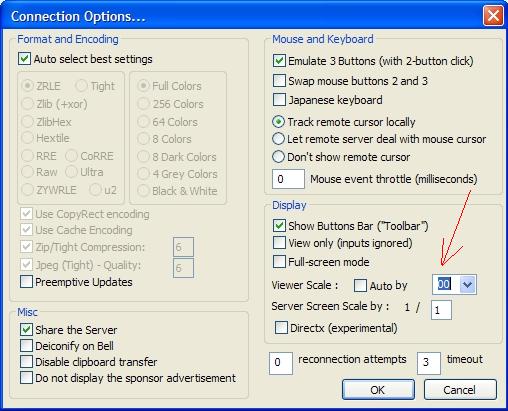
As you can see from this photo, see link. The red arrow, so it says only 00 you can not tell whether it is 200 or 300 It's the same when you see the IP and port, the window is too short. It is English, no other language.
http://www.timelapse.dk/misc/options.jpg
Search found 3 matches
- 2012-01-22 17:10
- Forum: Feature requests
- Topic: Regarding the UI.
- Replies: 5
- Views: 17121
- 2012-01-19 07:52
- Forum: Feature requests
- Topic: Regarding the UI.
- Replies: 5
- Views: 17121
Re: Regarding the UI.
Thanks for the reply.
I use 96 dpi and normal fonts. I usually have no problems with other programs about what I have described. My screen resolution is 1680 x 1050
I've tested it on my PC at work and it shows the same error in the UI.
Regards
Nobel
I use 96 dpi and normal fonts. I usually have no problems with other programs about what I have described. My screen resolution is 1680 x 1050
I've tested it on my PC at work and it shows the same error in the UI.
Regards
Nobel
- 2012-01-08 08:37
- Forum: Feature requests
- Topic: Regarding the UI.
- Replies: 5
- Views: 17121
Regarding the UI.
When you open the UltraVNC viewer and look at options, then under “Display” you can set % between 25 and 400 %. But the window is to small, you can not see if is says 100 or 400 %.
When you are connected you have a little window where you can se the IP of the server. If you have a port number of 5 ...
When you are connected you have a little window where you can se the IP of the server. If you have a port number of 5 ...